


Disclaimer: We are an independent, fan-made Earth 2 website. This website is intended for informational purposes only and should not be understood or construed as financial advice.
Since the Earth 2 launch, the game has had immense interest from users worldwide.
Players have been anticipating new features and updates as promised by the development team.
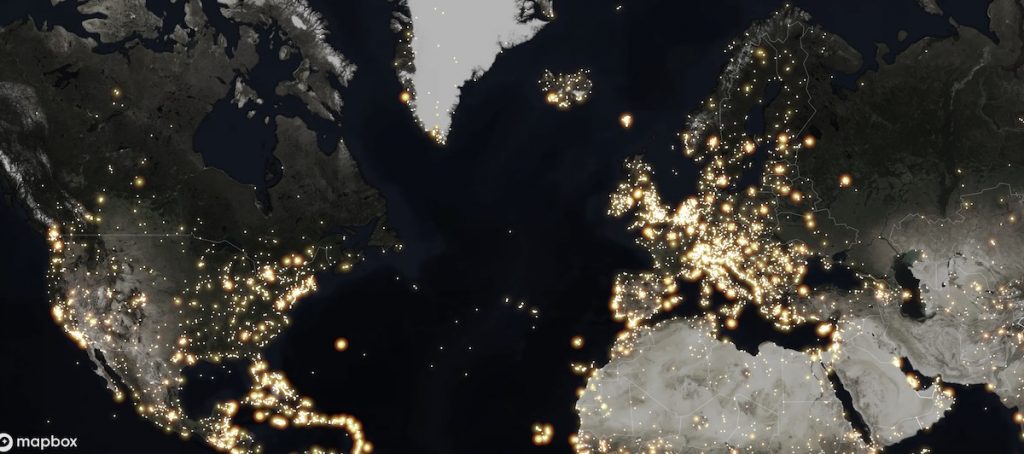
The new Earth 2 heatmap feature is now live and accessible by all players.
How to use the Heatmap in Earth 2
The heatmap is activated by making sure the toggle is highlighted in the 2nd row of the header.

By selecting this, the map will convert to a heatmap.
It leaves users with a spectacular visual representation when zooming out further.
What Does The Heatmap Show in Earth 2?
The Earth 2 heatmap shows a quick visual representation of where players are buying tiles and properties.
Earlier today, the developers made an official statement via their Facebook page:
You will soon notice a heatmap toggle option available on the Earth 2 website app which displays where transactions and purchases have been occurring across the Earth 2 globe! The results are quite stunning and give an amazing insight into where hot zones are appearing on Earth 2!
Earth 2
Whether or not this tracks transactions within a certain time period or purchases since the beginning of the game wasn't made clear.
Using the heatmap correctly is just 1 feature players need to remember to use. We have a full list of other vital aspects of Earth 2 in our ultimate beginner's guide.
The heatmap is an excellent way to view lots of transaction activity in more obscure areas of the globe which you may not have thought about visiting previously.
As an example, try it with the smaller islands scattered deep in the Indian or Pacific Ocean and you'll be amazed how much activity is happening there.
SAVE on Earth 2 Purchases - How to Use the 5% Promo Credit
Also confirmed: Logan Paul Spends Nearly $6k on Earth2.io Properties


